Deck Conn Getting Started
Take the conn without wasting the first night on a dead reactor.
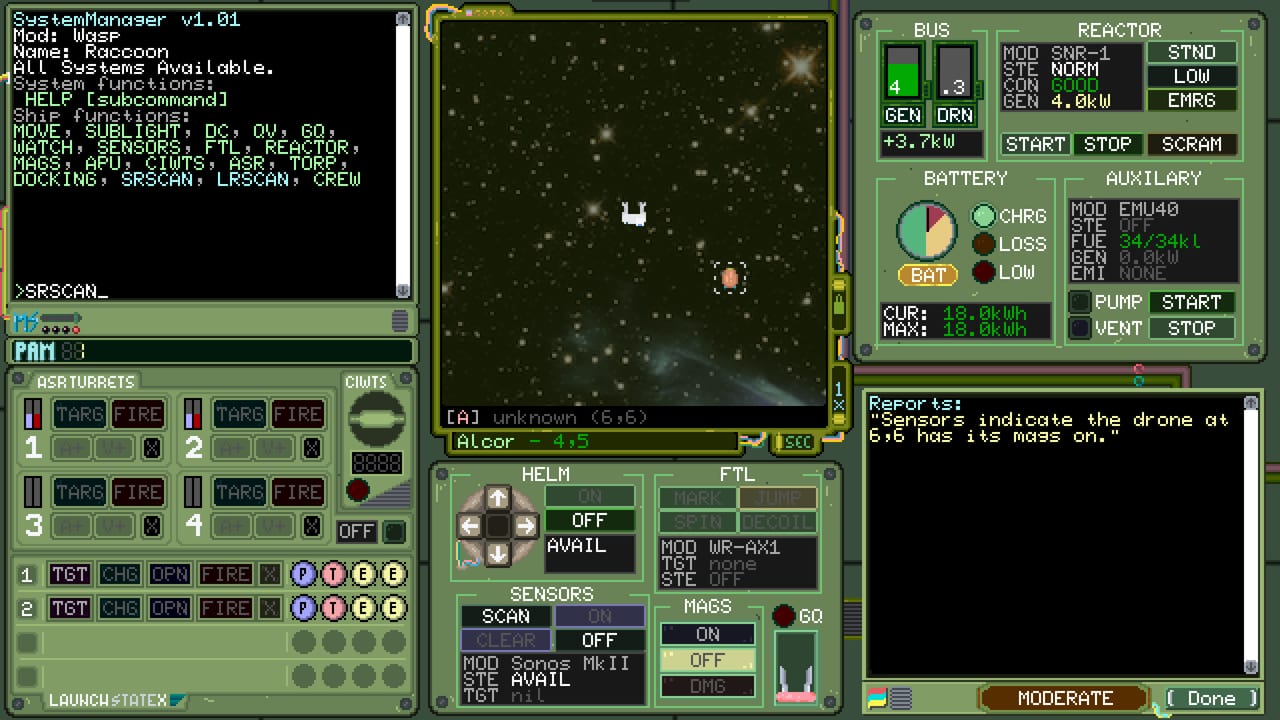
Deck Conn dropped on Steam on September 1, 2026. You command a nuclear-powered space corvette in a forever-war drawn as if 1989 had already put sailors among the stars. This page is the first-hour path: buy, boot, start the reactor, survive the departure checklist, and leave the first patrol with a ship that can still see.
The game is single-player. Steam lists Family Sharing and an English interface. There is no multiplayer seat and no second captain on voice chat. Plan your evening around one command chair and a notepad.
Press screenshots show the flavour you are walking into: a Wasp-class corvette (one example is CEN Raccoon) of the Colonial Earth Navy, undocking from platforms such as Coyote in Charlie sector, with an FTL jump panel sitting next to helm and a reactor that can START, STOP, or SCRAM. Mission briefings on a CEN-IT terminal can order you to locate a contact — for example an FNA gunboat — and incapacitate or destroy it. That is the loop. Do not skip the glass.
Buy, install, and confirm the box can run it
The store app ID is 3828500. List price at launch sat at $14.99 with an introductory discount advertised through mid-September 2026. Before you install, open the system requirements page. Minimum Windows 10, an Intel i5-class CPU, 2 GB RAM, a DirectX 10.1 GPU with 2 GB, and about 1 GB of disk are the published floor. macOS wants Sequoia; Linux lists Ubuntu 23.10+ / GLIBC 2.38. Steam Deck compatibility was still listed as unknown at launch, so do not assume a handheld session will be verified.
Install, then set Steam’s in-game overlay so you can alt-tab to this wiki without losing a turn. Deck Conn thinks in turns and terminals, not in twitch flicks, but a frozen overlay still ruins a sensor sweep.
What “taking the conn” actually means
Launch copy from MicroProse is unusually specific: start the reactor, follow the ship’s departure checklist, and operate systems through detailed diegetic interfaces. You are not flying a fighter. You are a captain staring at phosphor glass, deciding which subsystem still gets amps. Read Controls in parallel if the UI feels like a museum exhibit. Read Ship Systems before you dump the whole reactor into weapons because a blip looked rude.
A sane first-hour order:
- Complete whatever onboarding or standalone tutorial the build offers.
- Find the reactor and battery readouts and write down what “idle” looks like.
- Power sensors to a level that paints contacts without screaming on every bearing.
- Confirm propulsion and a defensive system have a floor of power you will not steal for vanity shots.
- Only then arm weapons.
If that sequence feels slow, good. The fantasy is Cold War naval command, not an action beat-em-up. The power planner exists so you can rehearse the same budget on paper.
First contacts and imperfect information
The forever-war loop is: receive HQ orders, investigate unidentified contacts, answer distress calls, and decide whether the ship on the plot is a prize or a wreck. Sensors are split into active and passive in the launch feature list. Passive keeps you quieter. Active paints a cleaner picture and tells everyone you are looking. New captains ping too early, then wonder why the next turn arrives with company.
Do not treat the first smear as a kill. Close range only after you know facing, weapons, and whether you can capture instead of punching holes you cannot patch. The combat guide covers range and targeting; this page only needs you to survive the first decision without emptying the magazine.
Campaign versus standalone scenarios
Deck Conn ships a dynamic campaign of war patrols plus tightly designed standalone missions. If the campaign immediately throws coded orders and a damaged auxiliary bus at you, drop into a standalone scenario. Those exist to teach fundamentals: positioning, system targeting, capture-or-destroy, and not flying deaf. Use them. Then start a campaign patrol with the campaign walkthrough open.
Crew promotions and ship upgrades are campaign tools, not first-hour toys. Leave the crew page for after you have finished one patrol without a reactor SCRAM. Promoting a gunner because the first shot hit is how you inherit a bridge full of specialists who cannot run damage control.
What not to do on day one
- Do not spend the whole reactor on active sensors “just to see.”
- Do not ignore fuel and batteries because the pixel art looks cozy.
- Do not assume multiplayer friends can take a station. They cannot.
- Do not chase a full “perfect” upgrade tree before you understand which systems actually matter.
- Do not skip the Updates Hub. Launch-week notes beat a stale Reddit screenshot.
After the first successful patrol
Log what you powered, what you starved, whether you captured or destroyed, and who on the crew actually did work. Compare that log to the tactics tier list and adjust. If a fight felt unfair, it may have been a power problem rather than a damage problem — go back to systems before you blame the plot.
When you want a second opinion on whether the game is for you, read the launch review. When you want official files and socials, use the links hub. Then take the conn again with a checklist, not a vibe.
Frequently Asked Questions
Quick answers captains actually search for after launch.
Is Deck Conn free to play?
No. It is a paid Steam release. Launch list price was $14.99 with a short introductory discount.
Is there a tutorial?
The design includes standalone combat scenarios for fundamentals plus a departure checklist. Use those before a full war patrol; see Combat.
What language is the game in?
Steam listed English for the interface at launch. This wiki also offers French, German, and Spanish articles.
Can I play with a friend?
No. Deck Conn is single-player only.